
Incident report template Word: a guide for safety managers
Incident report template Word: a guide for safety managers
A practical guide for UK safety managers on building and using a Word incident report template that supports accurate reporting, stronger investigations, and compliance with RIDDOR, HSE expectations, and wider duty-holder responsibilities under frameworks such as CDM 2015 and the Building Safety Act.
TL;DR
- A Word incident report template documents workplace incidents systematically and supports legal compliance.
- It should include key sections for incident overview, people involved, witness accounts, factual description, injuries or damage, immediate actions, root cause analysis, and corrective measures.
- Good template design improves completion quality, protects evidential value, and helps organisations demonstrate due diligence to the HSE, insurers, and internal auditors.
- For UK employers, the format should support RIDDOR classification, retention of records for at least six years, and a blameless, system-focused reporting culture.
An incident report template in Word is a customisable form used to document workplace incidents systematically, accurately, and in a format that supports both regulatory compliance and safety improvement. For UK safety professionals, this kind of structured document is not optional. Under RIDDOR (the Reporting of Injuries, Diseases and Dangerous Occurrences Regulations), employers must report serious incidents to the Health and Safety Executive (HSE) within defined deadlines and retain records for a minimum of six years. A well-designed Word template gives your team a consistent, repeatable process for capturing every detail that matters, from the initial incident description through to corrective actions and root cause analysis.
What sections must an incident report template Word document include?
A well-structured incident report includes sections covering the incident overview, people involved, a narrative summary, injuries and damage, witness details, actions taken, and follow-up measures. Each section serves a specific purpose, and omitting any one of them creates gaps that regulators, insurers, and legal teams will notice.
The core sections your template needs are:
- Incident overview: Title, date, time, and exact location. This anchors the report to a specific event and supports cross-referencing with site logs, permit systems, access records, or CCTV.
- People involved: Names, job roles, employer details where relevant, and contact information for those directly involved. Include a note on confidentiality obligations, particularly where medical information is recorded.
- Witnesses: Names and statements from anyone who observed the incident. Corroborating accounts strengthen the report’s credibility and help investigators separate fact from assumption.
- Factual incident description: A clear, objective account of what happened. Incident descriptions should remain strictly factual, avoiding speculative or subjective language to preserve credibility for legal, disciplinary, and insurance processes.
- Injuries, damage, and business impact: Record the nature and severity of any injuries, property damage, environmental impact, and any operational disruption caused.
- Immediate actions taken: What was done at the scene, including first aid, isolation of equipment, site evacuation, emergency service contact, and temporary controls.
- Root cause analysis fields: Space for structured techniques such as the 5 Whys, which traces an incident back through successive causes to identify the underlying system failure.
- Corrective and preventive actions: Specific tasks assigned to named individuals, with deadlines and verification fields. Missing corrective action fields can leave organisations exposed during legal discovery, insurer review, or external audit.
Pro Tip: Add a dedicated consent field for photographing injuries or the incident scene. This protects both the organisation and the individuals involved, and supports privacy compliance under UK data protection law.
How do you design a Word incident report template for clarity?
Template design directly affects whether safety managers actually complete reports accurately. A cluttered or poorly formatted document increases the chance of missed fields, inconsistent entries, and weak evidence. The following steps produce a template that is both professional and practical.
- Use tables for field alignment. Place question labels in the left column and answer spaces in the right. Tables and sufficient narrative space improve user compliance and report accuracy. This structure prevents the freeform layout that leads to inconsistent entries.
- Allocate generous space for narrative sections. The incident description and root cause analysis fields need room. A single line is never enough. Set these rows to a minimum height that signals the level of detail expected.
- Apply consistent fonts and formatting. Use one font family throughout, such as Arial or Calibri at 11pt. Bold field labels and use normal weight for answer areas. Consistency signals professionalism and reduces cognitive load for the person completing the form.
- Protect the template structure. Use Word’s document protection feature to lock headings, labels, and table borders while leaving answer fields editable. This prevents accidental deletions that corrupt the template over time.
- Include dropdown lists or checkboxes where appropriate. For fields like incident type, severity level, RIDDOR category, contractor status, or department, a dropdown or checkbox reduces free-text errors and makes data easier to analyse across multiple reports.
Pro Tip: Save your master template as a Word template file (.dotx) rather than a standard document (.docx). This means every new report opens as a fresh copy, preserving the original structure.
How do UK compliance requirements shape your incident report format?

UK health and safety law sets specific obligations that your incident report format must reflect. Building these requirements directly into the template removes the risk of omitting legally required information under pressure after an incident.
The key compliance considerations are:
- RIDDOR reporting obligations: Under RIDDOR, employers must report specified injuries, over-seven-day incapacitation injuries, occupational diseases, and dangerous occurrences to the HSE. Your template should include a dedicated RIDDOR classification field so the responsible person can immediately identify whether statutory reporting is triggered. A full breakdown of these obligations is available in the RIDDOR reporting guide published by LifeSafety.ai.
- Reporting timelines: Post-incident meetings should be held within 48 hours of resolution, and final reports shared within one week. These timelines support accuracy and stakeholder accountability. Build a completion deadline field into the template header.
- Record retention: Incident records should be retained for at least six years, aligning with the UK limitation period for personal injury claims. Your template should include a document reference number, version date, and storage location reference to support organised long-term retention.
- Consent for photography: Data collected within 24–48 hours after an incident is significantly more accurate. Include a consent section for photographing injuries or the scene to satisfy privacy obligations and internal governance requirements.
- Blameless reporting culture: One of the most common mistakes in incident reporting is producing blame-oriented reports instead of reports focused on system failures and root causes. Template language should guide reporters toward objective, system-focused descriptions.
“A blameless reporting culture, supported by structured templates, produces more honest accounts and better safety outcomes. The goal is to understand what failed in the system, not who failed in the moment.”
For organisations working in demolition and civil engineering, the incident reporting requirements in demolition add further sector-specific obligations worth incorporating into your template design. On higher-risk projects, it is also sensible to align your reporting fields with wider duty-holder responsibilities under CDM 2015 and, where relevant, the Building Safety Act, especially where incidents may affect design risk management, principal contractor controls, or the golden thread of safety information.
Step-by-step: how to complete an incident report using your Word template
Completing a report accurately requires discipline and a clear process. The quality of the data you capture in the first 48 hours determines the value of everything that follows.
- Gather details promptly. Begin completing the report within 24–48 hours of the incident. Memory degrades quickly, and timely data collection greatly improves accuracy in safety documentation.
- Use factual, non-judgemental language. Write what was observed, not what was assumed. Replace “the worker was careless” with “the worker did not use the provided PPE.” Objective language protects the report’s credibility in legal proceedings.
- Consult witnesses. Cross-reference the primary account with witness statements. Note any discrepancies and record them as separate observations rather than resolving them editorially.
- Complete the root cause analysis fields. Apply the 5 Whys technique: ask why the incident occurred, then ask why again for each answer, repeating until you reach the underlying system failure. The accident investigation module from LifeSafety.ai supports this structured approach digitally.
- Assign corrective actions. Every identified cause needs a named owner and a deadline. Vague actions with no accountability rarely get completed.
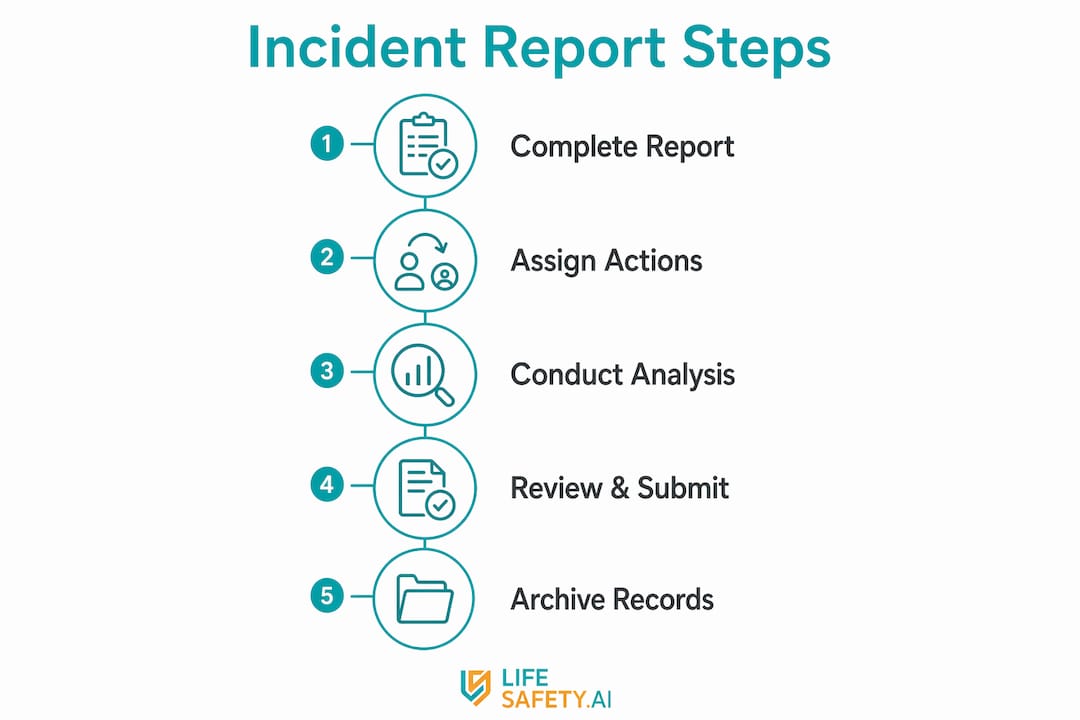
- Review and circulate the report. Share the completed document with relevant stakeholders within one week of the incident. File it in your records system with a unique reference number.
The table below summarises the key steps and their compliance rationale.
| Step | Action | Compliance rationale |
|---|---|---|
| 1 | Complete report within 24–48 hours | Preserves accuracy; supports RIDDOR timelines |
| 2 | Use objective, factual language | Protects legal and insurance credibility |
| 3 | Record witness accounts separately | Strengthens evidentiary value |
| 4 | Apply 5 Whys root cause analysis | Identifies system failures; required for audits |
| 5 | Assign corrective actions with owners | Prevents recurrence; demonstrates due diligence |
| 6 | File and retain for minimum six years | Meets UK personal injury limitation period |
Key takeaways
A compliant incident report template in Word must include root cause analysis fields, corrective action assignments, and RIDDOR classification to satisfy UK legal and insurance requirements.
| Point | Details |
|---|---|
| Structure is non-negotiable | Include all eight core sections: overview, people, witnesses, description, injuries, actions, root cause, and corrective measures. |
| Design affects completion quality | Use tables, protected fields, and consistent formatting to reduce errors and improve usability. |
| Compliance must be built in | Add RIDDOR classification fields, a consent section, and a document retention reference to every template. |
| Timing determines data quality | Complete the report within 24–48 hours; circulate the final version within one week of the incident. |
| Blameless language is a legal asset | Objective, system-focused descriptions protect the organisation in insurance and legal proceedings. |
Why I think most Word incident templates fail before they are even used
Most incident report templates seen in the field share the same flaw: they were designed by someone who has never had to complete one under pressure, minutes after a serious event on a busy site. The result is a document that looks thorough on paper but collapses in practice. Fields are too small. The root cause section is a single blank box. There is no guidance on what “factual language” actually means for someone who is stressed and looking for someone to blame.
The templates that actually work are the ones built around the person completing them, not the person who designed them. That means generous space for narrative, plain-language prompts inside each field, and a clear visual hierarchy that guides the reporter from top to bottom without confusion. It also means protecting the template so that a rushed manager cannot accidentally delete a table row and submit a structurally broken document.
The shift toward digital reporting tools is real and accelerating. But Word templates remain the practical starting point for many organisations, particularly smaller teams and those operating across multiple sites without a unified platform. The key is treating the Word document as a transitional tool, not a permanent solution. Build it well, train your team to use it consistently, and make sure the information captured can later feed into a wider safety management system for trend analysis, action tracking, and audit readiness.
In practical terms, that means your Word template should not exist in isolation. It should connect to your wider incident management process, including supervisor escalation, RIDDOR review, corrective action tracking, and lessons learned. If your organisation operates under CDM 2015, the findings may also need to inform construction phase planning, contractor coordination, and future risk controls. If you manage occupied higher-risk buildings, the same reporting discipline supports the evidence trail expected under the Building Safety Act.
My view is simple: a good template does not just help you record an incident. It helps you prove that the organisation responded competently, investigated proportionately, and acted to prevent recurrence. That is what matters when the HSE asks questions, when insurers review the file, and when senior leaders want confidence that lessons have actually been learned.
Practical next steps for safety managers
- Review your current Word incident report against the eight core sections listed above.
- Add fields for RIDDOR classification, photo consent, document reference, and corrective action ownership.
- Test the template with supervisors and site managers in a realistic scenario to identify usability issues.
- Align the form with your internal investigation workflow, including escalation, review, and close-out.
- Where possible, move from static documents to connected reporting through the LifeSafety.ai accident investigation module so actions, evidence, and trends can be managed centrally.
Related Articles

Incident reporting software comparison: UK guide 2026
Discover our incident reporting software comparison for UK workplaces. Explore top options like Lifesafety, SafetyCulture, and more.

Safety management solutions for construction: UK SMS guide
Discover essential safety management solutions for construction sites in the UK. Learn how a mobile-first SMS can enhance safety and compliance.

Best health and safety software for UK workplaces: 2026 guide
Discover the best health and safety software for UK workplaces in 2026. Explore top picks like Lifesafety for compliance and efficiency!